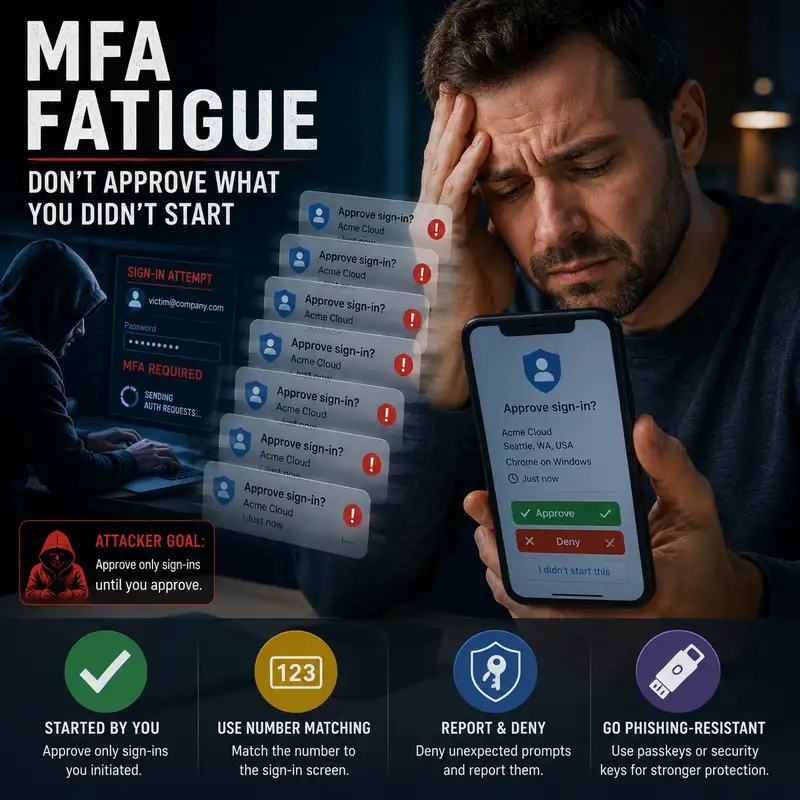
What Is MFA Fatigue?
A login approval prompt is supposed to be a security decision, but repeated prompts can turn that decision into an interruption that someone wants to make disappear. A user may approve one because the request looks routine, because several prompts arrive during a busy moment, or because tapping approve seems like the fastest way to stop the noise. That creates a practical problem for both users and defenders: how can an authentication control become the pathway an attacker uses to gain access? In this episode, we will answer that question by examining M F A fatigue, the attack pattern often called prompt bombing, and the protections that make an approval request harder to misuse. By the end, you should be able to recognize why repeated prompts are dangerous, what they may reveal about an account, and which controls reduce the chance that one mistaken approval becomes a successful sign-in. Multifactor authentication (M F A) requires a person to present more than one kind of evidence before access is granted, such as a password plus a trusted device, security key, biometric check, or approval action. M F A fatigue is the pressure created when authentication prompts arrive repeatedly and the user becomes more likely to approve one without carefully validating it. Prompt bombing is the attacker behavior that creates that pressure by causing repeated approval requests to reach the target. The terms are connected, but they are not identical. Prompt bombing describes the repeated requests, while M F A fatigue describes the human response those requests are intended to produce. The main distinction to remember is that the attacker is not necessarily defeating the cryptography or breaking the authenticator. The attacker is trying to turn a legitimate approval mechanism into a rushed human decision. In many M F A fatigue attempts, the attacker has already obtained, guessed, or otherwise acquired the account’s primary credential, usually the password. The password is used to begin a sign-in, and the authentication system then sends a prompt to the registered device because a second factor is still required. The attacker cannot complete the sign-in alone, so repeated prompts are triggered in the hope that the account owner will approve one. A prompt may arrive immediately, at irregular intervals, or during a time when the user is likely to be distracted, but the defensive meaning is the same. An unexpected authentication request shows that someone or something may be attempting to use the account. Repeated requests are therefore not just annoying notifications. They can be evidence that the password is exposed and that the second factor is preventing an unauthorized login. The technique works by exploiting ordinary human behavior rather than a lack of intelligence or care. People become accustomed to routine prompts, especially when they sign in to several services throughout the day. Repetition can weaken attention because each new alert looks similar to the last, and the person may focus on stopping the interruption instead of validating the request. Accidental approval is also possible when the approve button is easy to reach or when the notification appears while the person is using the device for something else. Attackers may combine repeated prompts with social pressure, such as an unsolicited message that falsely claims a request is part of a support process. The important point is that fatigue changes the context of the decision. A control designed for deliberate confirmation becomes less reliable when the interface encourages a quick response to persistent noise. An authentication prompt should give the user enough information to decide whether the request belongs to a sign-in they actually started. Useful details include the application or service requesting access, the approximate location, the device or browser involved, and the time of the attempt. Clear language should explain that approving the request will authorize a login, rather than presenting a vague yes-or-no question with little context. No single detail is perfect. Locations can be imprecise, network addresses can appear unfamiliar, and legitimate devices may be described in ways the user does not recognize. The strongest immediate test is whether the person initiated a sign-in at that moment. If the answer is no, the request should not be approved, even when other details appear plausible. Clear notifications support that decision by making an unexpected request easier to identify and report. Number matching improves push-based authentication by requiring the user to connect the prompt on the trusted device with the sign-in screen they are actively using. The sign-in screen displays a number, and the authenticator asks the user to enter or select that same number before approval is completed. A person who did not begin the login should not have a valid number to match, so a blind tap on approve is less likely to authorize an attacker’s request. This also interrupts the habit of treating every prompt as a simple yes-or-no decision. Number matching is stronger than a basic approval button, but it is not the same as phishing-resistant authentication. A convincing phishing site may relay information from a real sign-in and persuade a user to enter the displayed number. Number matching reduces accidental and reflexive approvals, yet it still depends on the user recognizing whether the sign-in destination is legitimate. Organizations can also reduce M F A fatigue by changing how the authentication system responds to repeated requests. Prompt limits, temporary blocks, risk-based challenges, and automatic suppression of excessive approvals can prevent an attacker from generating an endless stream of notifications. The authenticator should provide an obvious way to deny and report a request, and the security team should receive enough context to investigate the account quickly. Policies should avoid making push approval the only practical option for every situation, especially for administrators and other high-impact accounts. Just as important, repeated prompts should be treated as a possible security event rather than a user inconvenience. A well-designed system does not place the entire burden on the person holding the phone. It reduces abusive request volume, improves the decision interface, and creates a response path when suspicious activity appears. Before we continue, this is a brief promotional message. This episode is brought to you by the Bare Metal Cyber Academy. The Academy provides a place for people who want to continue developing practical cybersecurity knowledge through clear, structured education. Its purpose is to make complex topics easier to understand without turning them into slogans or shortcuts. The focus is on helping learners understand security concepts, professional decisions, and defensive practices in language they can apply. You can visit Bare Metal Cyber dot com to explore the Academy and see the learning opportunities currently available. Now, let’s return to what a user and a security team should do when repeated authentication prompts begin. When an unexpected prompt appears, the safest response is to deny it and use the reporting function when one is available. Repeated requests should not be handled by approving one, ignoring the pattern indefinitely, or disabling notifications without addressing the account. Because the attacker may already know the password, the user should change that password through a trusted path and avoid following links delivered in an unsolicited message. The security team may need to revoke active sessions, review recent sign-ins, confirm whether new devices or authentication methods were registered, and determine whether any approval succeeded. The exact response depends on the environment, but the principle is consistent. Stop the pending access attempt, protect the account’s primary credential, and examine whether the attacker gained anything before the prompts were noticed. Treating the event as mere notification spam can leave the underlying credential exposure unresolved. Authentication logs can help defenders distinguish an isolated accidental prompt from a coordinated fatigue attempt. Useful evidence includes repeated sign-in attempts against the same account, the timing and source of the requests, failed password or second-factor events, a later successful approval, and changes to registered devices or recovery methods. Defenders should also review what happened after any successful authentication, including session creation, access to sensitive applications, privilege use, and attempts to establish another way back into the account. One unusual location is not proof of compromise, because network routing and mobile connections can produce misleading location data. The investigation becomes stronger when several facts align. A burst of requests, an approval the user did not intend, and subsequent account activity together provide a clearer basis for containment than any one alert considered alone. Phishing-resistant authentication reduces reliance on approval prompts altogether. Passkeys and hardware security keys based on Fast Identity Online (F I D O) standards use public-key cryptography and bind the authentication process to the legitimate service. The user proves possession of the registered authenticator, but a reusable secret is not sent to a look-alike site, and there is no generic push request that can be approved from an unrelated login. This design helps prevent both prompt bombing and many credential-phishing attacks because the authenticator checks the service it is communicating with. The protection is strongest when high-risk accounts cannot fall back to weaker methods that an attacker can manipulate. Recovery procedures, help-desk verification, and backup factors therefore deserve the same attention as the primary sign-in method. A phishing-resistant front door can still be undermined by an overly permissive recovery path. M F A remains valuable even though fatigue attacks exist. The repeated prompts often show that the second factor is doing its job by blocking someone who already has the password. The weakness appears when the system allows unlimited requests, provides little context, or depends on a user repeatedly making the same approval decision under pressure. Stronger protection combines unique passwords, password managers, prompt throttling, clear reporting, monitored authentication logs, and phishing-resistant methods for accounts with greater consequences. Legacy sign-in methods that bypass modern authentication should also be removed where they are no longer required. None of these controls should be treated as a perfect barrier. Their purpose is to reduce the attacker’s opportunities, make suspicious activity visible, and prevent one hurried action from becoming the only line between a stolen password and account access. Training for M F A fatigue should be simple enough to remember during an interruption. Users should approve only authentication requests connected to a sign-in they personally initiated, and they should deny and report unexpected prompts without trying to make them stop through approval. Training should also explain why repeated prompts may mean the password is already compromised, because that understanding changes the response from notification management to account protection. Security teams should avoid blaming users who report a mistaken approval. Fast reporting gives defenders a better chance to revoke sessions and contain access, while fear of punishment encourages delay. The organization should reinforce the same message through the interface, the help desk, and incident procedures. A person should not have to remember a complicated policy while notifications are arriving. The secure action should be obvious, supported, and easy to complete. A practical way to evaluate protection against M F A fatigue is to examine the entire approval path from request to response. Ask whether a user can tell which service is requesting access, whether the user must connect the request to a login they initiated, and whether repeated prompts are limited or escalated. Then examine what happens after denial or reporting. The security team should receive useful evidence, the account should be reviewed for password exposure, and any active sessions or new authentication methods should be checked. For higher-risk access, determine whether a phishing-resistant method can replace push approval rather than merely improving the prompt. This review should include recovery and fallback options, since attackers often look for the least protected path. The test is not whether M F A is enabled. The test is whether the complete authentication process resists pressure, confusion, and repeated abuse. M F A fatigue is the human pressure created when an attacker repeatedly sends authentication prompts and hopes that one will be approved. Prompt bombing supplies the repetition, while weak notification design and simple push approval can make the tactic more effective. Number matching and clearer request details reduce blind or accidental approvals, especially when users are taught to authorize only sign-ins they started themselves. Prompt limits, reporting, session review, and credential resets help contain the event when it occurs. Phishing-resistant methods such as passkeys and security keys provide stronger protection because they do not depend on approving a generic request and they bind authentication to the legitimate service. The practical decision is therefore not whether to abandon M F A. It is to replace fragile approval patterns with authentication that gives users clear context, limits repeated pressure, and resists phishing at the protocol level.