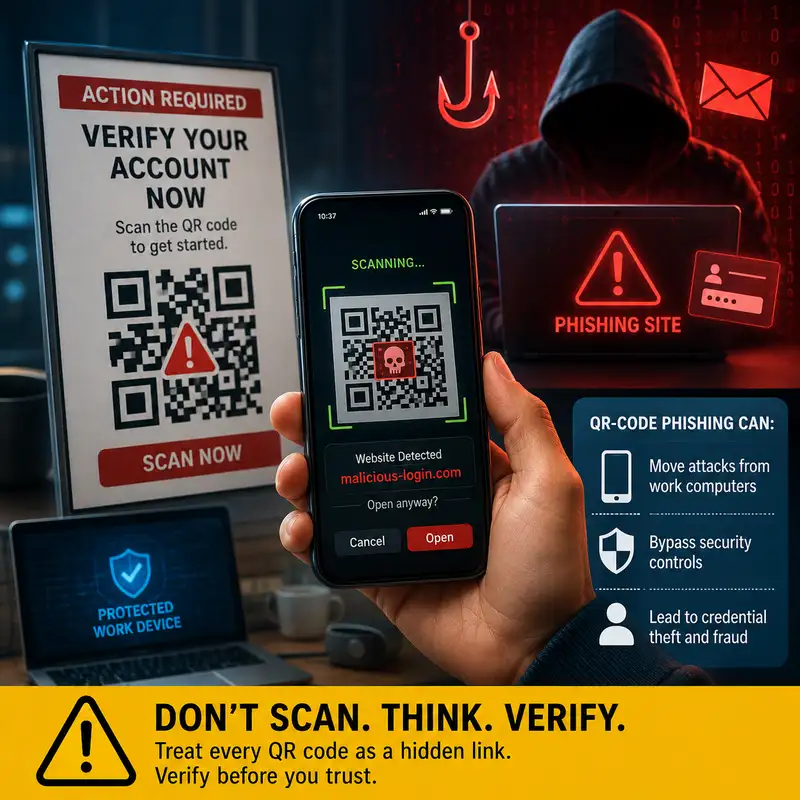
What Is QR-Code Phishing?
Quick Response (Q R) codes often receive more trust than ordinary links because they look like neutral images rather than clickable addresses. That visual difference creates a dangerous misunderstanding: people may believe that scanning is safer than clicking, even though both actions can send a device to an attacker-controlled destination. The practical question is not whether a square pattern looks legitimate. The question is whether you can verify who created it, where it leads, and what the destination asks you to do. That decision matters because a convincing Q R code can bypass habits that normally help someone inspect an email link, recognize a suspicious domain, or rely on protections built into a work computer. By the end of this episode, you should be able to explain what Q R code phishing is, why it changes the way a link is evaluated, and how to respond without treating every Q R code as either harmless or automatically malicious. Q R code phishing is a form of phishing that places a malicious or deceptive destination inside a machine-readable image. A Q R code can encode information such as a web address, contact record, payment request, or wireless network setting. Phishing is an attempt to persuade someone to reveal information, approve an action, send money, or visit a harmful destination by abusing trust and urgency. When those two ideas are combined, the image becomes the delivery mechanism and the destination becomes the place where the deception continues. The main distinction to remember is that the Q R code is not the attack by itself. It is a container that hides information from ordinary human inspection, which makes it easier to move someone from a trusted message, document, sign, or screen to an untrusted website or application. A normal web link exposes at least some of its destination as text. A person may be able to hover over it, read the domain, notice a spelling change, or see that the link points somewhere unrelated to the message. A Q R code replaces that visible address with a pattern of blocks that most people cannot interpret directly. The camera or scanning application decodes the pattern and presents the result, but the quality of that warning depends on the device, the application, and the person’s attention. Some scanners show the full address before opening it, while others emphasize convenience and make the transition feel nearly automatic. That reduced visibility is the core advantage for the attacker. The image does not need to defeat cryptography or break the camera. It only needs to make the destination harder to evaluate before the user reaches it. Q R code phishing can arrive through email, a document, a printed notice, a presentation, a package insert, a payment request, or a sign placed in a public location. The delivery method changes, but the social engineering often remains familiar. The message may claim that an account requires verification, a document is waiting, a payment failed, a security setting must be updated, or access will be lost unless the code is scanned. Printed codes create an additional problem because they may appear outside the digital systems that normally inspect messages and links. A code can also be placed over a legitimate code with a sticker, causing the physical object to appear trustworthy while the destination has changed. The presence of a recognizable logo, official colors, or professional formatting does not validate the code. Those visual elements describe appearance, not ownership or destination. One of the most important features of Q R code phishing is its ability to move an attack from a managed work computer to a personal phone. A protected workstation may use web filtering, endpoint security, browser controls, restricted application access, and centralized logging. When a message tells the recipient to scan the screen with a phone, the next step may occur on a device that the organization does not manage and cannot observe in the same way. The phone may use a different network, a personal browser, saved passwords, personal email, or applications that are outside the organization’s security controls. This shift can also separate the original message from the resulting web session, making automated detection and investigation more difficult. The attacker is not merely hiding a link. The attacker is changing the device, control environment, and evidence available to defenders. Scanning a Q R code does not always mean that compromise has already occurred. In many cases, the scan simply reveals or opens a destination, and the harmful result depends on what happens next. The site may imitate a familiar sign-in page, request a password, ask for a multifactor authentication code, seek payment information, prompt an application installation, or request permission to access data. A deceptive page may also use a real service to redirect the browser, which can make the first address appear less suspicious than the final destination. The important defensive distinction is between decoding the image, visiting the destination, and completing the requested action. Each step creates a separate opportunity to stop. A person who scans but does not enter information may face a different level of exposure than someone who submits credentials or approves an unexpected authentication request. The social engineering around the code often does more work than the technology itself. Urgency encourages immediate scanning before the destination is questioned. Authority may be implied through a message that appears to come from information technology, finance, human resources, a delivery service, or a known vendor. Convenience also plays a role because scanning feels faster than manually opening a trusted application or typing a known address. The code may be presented as a security improvement, such as a supposedly safer way to verify an account, which turns the language of protection into part of the deception. Attackers may also rely on shortened links, redirects, or look-alike domains after the scan. These techniques do not make the page legitimate. They make the path harder to understand while attention is focused on completing the requested task. Before we continue, this is a brief promotional message. This episode is brought to you by the Bare Metal Cyber Academy. The Academy is a place for people who want to continue developing practical cybersecurity knowledge through clear, structured education. It supports thoughtful learning about the concepts, decisions, and professional practices that shape security work. The material is presented for people who value direct explanations and practical context. You can visit Bare Metal Cyber dot com and explore the Academy to see the learning opportunities currently available. Now, let’s return to how you can evaluate a Q R code before allowing it to move you into an untrusted session. The safest response begins by separating the message from the action it requests. Ask whether you expected the communication, whether the sender normally uses Q R codes for that purpose, and whether the same task can be completed through a known application or website. When a code claims that an account needs attention, opening the official application independently is usually more trustworthy than following the embedded destination. If the scanner presents a preview, read the entire domain rather than looking only for a familiar word. Check for misspellings, unrelated domains, unusual subdomains, and addresses that hide the meaningful name deep inside a longer string. Do not treat the padlock symbol or Hypertext Transfer Protocol Secure (H T T P S) as proof that the site belongs to the claimed organization. A sign-in page reached through an unsolicited code should not receive a password, security answer, recovery code, or multifactor authentication approval merely because the page looks familiar. Payment requests require the same discipline, so confirm the amount, recipient, and purpose through an independent channel before submitting financial information. Organizations can reduce exposure by treating Q R codes as links that require inspection rather than as harmless images. Email and collaboration defenses may use image analysis to detect codes, decode their contents, evaluate the resulting addresses, and apply reputation or sandboxing controls. Those capabilities can help, but they may not identify every newly created domain, redirect chain, password-protected document, or code delivered through a physical medium. Mobile security controls can add web filtering, application restrictions, managed browsers, and reporting options on organizational devices. Security awareness should also explain the device-shifting tactic directly so employees understand why scanning a work message with a personal phone changes the protection available. The strongest approach combines technical inspection, clear reporting procedures, strong authentication, and a culture that does not punish people for pausing to verify an unexpected request. Physical Q R codes require attention to both the destination and the object carrying the code. A code on a parking meter, menu, event sign, kiosk, shipping label, or payment terminal may be legitimate, but the physical location does not guarantee that the image has not been replaced. Look for stickers placed over another label, mismatched printing, damaged edges, unusual instructions, or a code positioned where it does not fit the surrounding design. Those clues can support suspicion, but their absence does not prove safety because a replacement can be professionally printed. When payment or account access is involved, use the official application or manually locate the service whenever possible. A physical code should be evaluated as an untrusted pointer until its destination and purpose are confirmed, especially when it requests credentials, money, software installation, or device permissions. When someone reports a suspicious Q R code, the response should preserve enough information for defenders to understand both the original delivery and the destination. The message, document, photograph, or physical location may help identify who else received or encountered the code. The decoded address can be evaluated in a controlled manner by authorized security personnel rather than repeatedly opened by users. If credentials were submitted, the response may include changing the affected password, revoking active sessions, reviewing authentication activity, and confirming that multifactor settings or recovery information were not altered. If payment information was entered, the appropriate financial provider may need to be contacted. The exact response depends on what action occurred after the scan. Reporting should therefore include whether the code was only viewed, scanned, opened, or used to submit information. Several misunderstandings make Q R code phishing harder to recognize. First, Q R codes are not inherently dangerous. They are widely used for legitimate purposes, and the risk comes from the encoded destination and the action requested. Second, a phone is not automatically safer than a computer simply because mobile operating systems isolate applications and restrict some behaviors. The phone can still display a fraudulent page, accept credentials, approve a payment, or authorize an authentication request. Third, a polished page does not prove authenticity because visual design can be copied. Fourth, blocking all Q R codes is rarely practical when organizations use them for real workflows. The better objective is to reduce blind trust, improve inspection, and provide safer alternatives for sensitive actions. Correctly identifying the problem leads to controls that address deception rather than treating the image format itself as malicious. A practical way to evaluate a Q R code is to pause at four points in the interaction without turning the process into a technical investigation. Start with the source and ask whether the code arrived through a channel you expected. Consider the purpose and decide whether the requested action makes sense for that sender and situation. Inspect the destination before opening it, then compare the domain with the organization or service the message claims to represent. Finally, consider the consequence of continuing on that device. Entering a password, approving multifactor authentication, sending money, installing software, or granting permissions requires stronger verification than opening general information. When any part of that chain is uncertain, use a known website, official application, saved contact, or trusted support channel instead of the code. This method replaces urgency with a deliberate decision. Q R code phishing is phishing that uses a scannable image to conceal or obscure the destination that carries the deception forward. It is effective because people cannot easily read the encoded address, because scanning often feels routine, and because the code can move the interaction from a protected work computer to a less-controlled personal phone. The defensive response is not to fear every Q R code or assume that scanning alone always causes compromise. It is to verify the source, preview and inspect the destination, avoid submitting sensitive information through an unexpected path, and complete important actions through a trusted application or manually entered address. Organizations should support that behavior with code detection, mobile protections, strong authentication, and clear reporting. The specific practice to remember is this: treat every Q R code as a hidden link, and verify it before allowing it to choose your destination.