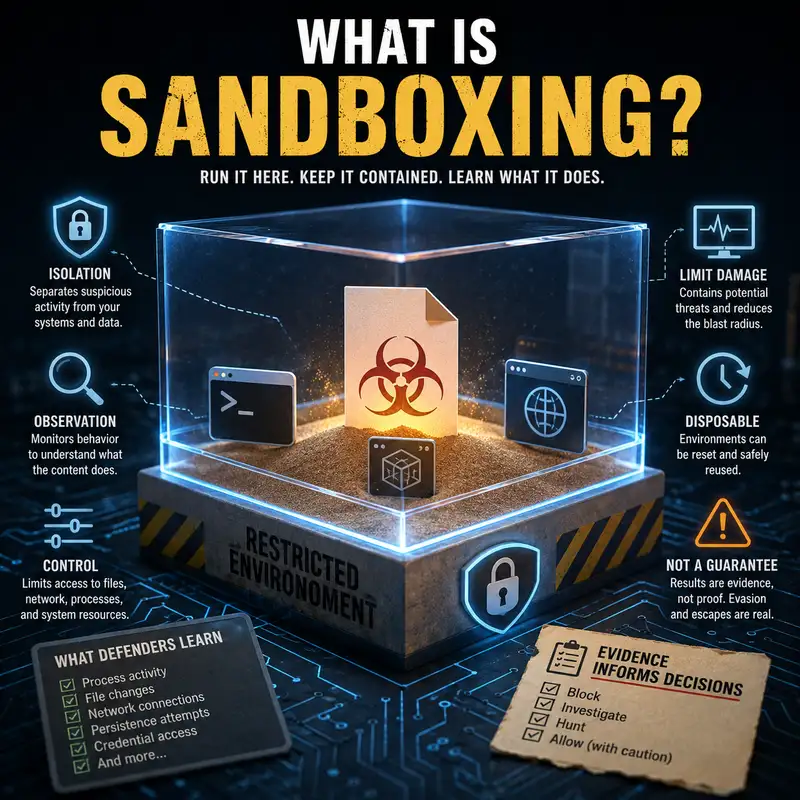
What Is Sandboxing?
Sandboxing is often described as a safe way to open something suspicious, but that description can create the wrong expectation. A sandbox is not a magical chamber that makes harmful code harmless, and it does not prove that a file, program, or website is trustworthy. It is a restricted environment designed to separate activity from the rest of a system while controlling what that activity can reach and change. The practical question is whether the isolation is strong enough, the observation is detailed enough, and the test lasts long enough to reveal meaningful behavior. Those decisions affect whether defenders can examine suspicious content without immediately exposing ordinary users, production data, credentials, or connected systems. By the end of this episode, you should be able to explain what a sandbox restricts, what defenders can learn from it, where its limits appear, and why sandbox results must be treated as evidence rather than a final verdict. A sandbox runs code or content inside boundaries that limit its access to the surrounding environment. Those boundaries may restrict files, memory, processes, devices, network connections, user privileges, and communication with other applications. Isolation is the central idea, while observation is often the second purpose. A sandbox can reduce the damage caused by suspicious behavior because the activity is separated from valuable systems, and it can help defenders study what the activity attempts to do. That makes sandboxing different from antivirus scanning, which often compares content or behavior against known indicators and detection logic. It is also different from a backup, which helps recover data after loss, and from a firewall, which controls network traffic rather than the entire execution environment. Sandboxing is therefore both a containment technique and, in many security tools, a controlled method of dynamic analysis. The restrictions inside a sandbox depend on how the environment is designed. A sandbox may give a program access to a temporary file system while blocking access to the user’s real documents. It may permit limited network communication, redirect connections to monitored services, or block external traffic entirely. It may also reduce privileges so the program cannot install system-wide components, alter protected settings, or interact freely with other processes. These controls follow the principle that untrusted activity should receive only the resources necessary for the test or task being performed. The strength of the sandbox comes from the boundary between the restricted activity and the host system. If that boundary is poorly configured, overly permissive, or vulnerable itself, the sandbox may provide much less protection than its name suggests. Isolation must be deliberately engineered, maintained, and tested. Sandboxing can be implemented in several ways, and the word does not describe one specific technology. An operating system may isolate an application by limiting its permissions and separating it from other processes. A browser may place website content into restricted processes so a malicious page has less ability to reach the device. A security product may open an attachment in a disposable virtual machine and record what happens. Containers can provide another form of isolation, although their security properties depend heavily on configuration and on the shared operating system components beneath them. Some sandboxes are local, while others run in a separate cloud service. The implementation matters because different designs create different boundaries, visibility, and escape risks. Calling something a sandbox tells you its purpose, but not automatically how strong the isolation is or which resources remain accessible. Observation turns a sandbox from a simple barrier into a useful defensive tool. When suspicious content runs, defenders may watch for process creation, file changes, attempts to modify startup behavior, network requests, access to credentials, unusual memory activity, or communication with other programs. The value comes from seeing what the content actually tries to do rather than relying only on what its code appears to contain. This is known as dynamic analysis because the item is examined while it is running. Dynamic analysis can reveal behavior that is hidden through packing, obfuscation, or delayed execution, although it does not guarantee that every hidden action will appear. The resulting evidence can support detection rules, incident investigation, blocking decisions, and deeper technical analysis. A sandbox does not merely ask what a file is. It asks what the file does under the conditions provided. Isolation can limit damage in several practical ways. A disposable environment can be reset after the test, removing files and changes made during execution. Restricted privileges can prevent the content from gaining the same authority as an administrator or system service. Segmented networking can stop the activity from reaching production systems, while controlled network access can reveal attempted connections without allowing unrestricted communication. Temporary data can be used so the content never receives real business information, personal records, or working credentials. These measures reduce exposure, but each one addresses a different path of harm. Resetting the environment helps remove changes after execution, while privilege restriction limits authority during execution. Network isolation controls communication, and test data reduces the value of anything the content can access. Effective sandboxing combines these protections rather than relying on a single barrier. A sandbox must balance realism with safety. If the environment is too restricted, suspicious content may fail to run normally, and defenders may learn very little. If it is too realistic and too connected, the test may expose systems or data that were supposed to remain protected. The environment also needs enough monitoring to capture meaningful activity without changing the behavior so much that the results become misleading. This balance explains why security teams may maintain different sandbox profiles for documents, websites, mobile applications, executables, or scripts. Each type of content expects different resources and produces different evidence. The test should provide enough normal functionality to encourage the item to reveal itself, while preserving firm boundaries around everything that matters. Sandboxing is therefore not only about building walls. It is about designing a controlled environment that produces useful evidence without creating unnecessary risk. Before we continue, this episode is brought to you by the Bare Metal Cyber Academy. The Academy is a place for people who want to keep developing practical cybersecurity knowledge through clear, structured education. Topics such as isolation, analysis, system behavior, and defensive decision-making become more useful when they are understood as connected parts of security work rather than isolated definitions. You can visit Bare Metal Cyber dot com and explore the Academy to see the learning opportunities currently available. The goal is steady development through explanations that help you understand both what a security concept means and how it affects real decisions. Now, let’s return to sandboxing and examine why a controlled environment can still produce incomplete or misleading results. One major limitation is that suspicious code may recognize that it is being observed. It may look for signs of a virtual machine, unusual hardware, a short system history, missing user activity, analysis tools, or network behavior that does not resemble an ordinary device. The code may then remain inactive, delay execution, or display harmless behavior. Some content requires a particular document action, command-line argument, date, language setting, or connection before its full behavior appears. If the sandbox does not provide those conditions, the analysis may end without revealing the important activity. This is often called sandbox evasion, but the defensive lesson is broader than the name. A clean result means that harmful behavior was not observed during that test. It does not prove that harmful behavior does not exist. Time, configuration, realism, and interaction all shape what the sandbox can see. Another limitation is that the sandbox itself has an attack surface. The isolation layer, monitoring tools, virtualization software, operating system, and management interfaces may contain weaknesses or configuration errors. In rare cases, malicious code may exploit a flaw and escape the restricted environment, reaching the host or another connected resource. More commonly, excessive permissions or unnecessary network access may create exposure without any sophisticated escape technique. Defenders reduce this risk by keeping the platform patched, separating analysis systems from production, limiting credentials, controlling outbound communication, and treating sandbox infrastructure as sensitive security equipment. The sandbox should also be disposable and recoverable so a compromised analysis environment can be rebuilt from a trusted state. Isolation reduces risk only when the boundary is stronger than the activity it is intended to contain. The label alone provides no protection. Browser sandboxing shows how this concept can protect ordinary activity without requiring a separate manual analysis session. Modern browsers often separate tabs, website processes, extensions, and sensitive browser components so content from one page has limited access to the rest of the device. This can reduce the damage caused by a malicious or compromised website because the page does not automatically inherit broad operating system privileges. The browser may also combine sandboxing with site isolation, permission prompts, download controls, and process restrictions. These measures are related, but they are not identical. Site isolation focuses on separating web content from different sites, while the broader browser sandbox limits what a web process can do outside the browser’s controlled environment. A browser vulnerability or unsafe extension can weaken those boundaries, which is why updates and permission management remain important even when sandboxing is present. Email and file security products often use sandboxing to examine attachments, links, and downloaded content before or after delivery. A document may be opened in a controlled environment to see whether it launches a script, creates another process, changes files, or contacts an external service. A link may be visited by an automated system that observes redirects, downloads, and page behavior. These tests can reveal suspicious activity that a static scan misses, especially when the content changes its behavior during execution. They can also produce false positives when legitimate software performs actions that resemble malicious behavior. Defenders therefore combine sandbox results with reputation, signatures, user context, endpoint evidence, and other detection sources. The purpose is not to let one tool make every decision. The purpose is to add observed behavior to the evidence available for deciding whether content should be blocked, investigated, or allowed. The output of a sandbox requires interpretation. A process tree can show which programs started other programs, but it does not automatically explain intent. A network request can identify a destination, but the destination may be legitimate, compromised, shared, or unrelated to the most important behavior. A file change may be expected for an installer and suspicious for a document viewer. Context determines whether an action supports a benign explanation or indicates harmful activity. Security teams should consider what triggered the behavior, which privileges were used, what resources were touched, whether persistence was attempted, and whether similar evidence appears on real endpoints. Sandboxing is strongest when its findings can be connected to other telemetry and translated into a clear defensive decision. Raw activity is evidence, not a conclusion. Interpretation turns that evidence into useful security action. A common misunderstanding is that sandboxing replaces other controls. It does not replace patching, least privilege, application control, endpoint monitoring, secure configuration, backups, or user awareness. It also does not make it safe to open unknown content on a production system merely because some software claims to isolate it. Sandboxing works best as one layer in a broader defensive design. It can contain some activity, reveal behavior, and reduce exposure during analysis, but another control may be needed to stop delivery, block execution, prevent credential access, or recover damaged data. The appropriate response depends on what the sandbox reveals and what it cannot test. A file that behaves suspiciously should be investigated or blocked according to established procedures. A file that appears quiet may still require additional analysis when its source, purpose, or technical characteristics remain uncertain. A useful way to evaluate sandboxing is to ask four practical questions without turning the answer into a promise of safety. First, identify what is isolated, including the program, process, browser content, file system, network, and user data. Then determine which actions are allowed and which resources remain reachable. Examine what the system records, how long it observes activity, and whether it can support the interactions needed to trigger realistic behavior. Finally, decide how the result will influence a real action such as blocking content, escalating analysis, creating a detection rule, or allowing limited use. This method keeps attention on boundaries, visibility, test conditions, and decision-making. It also exposes weak claims. A sandbox that cannot clearly describe its isolation and monitoring should not be trusted merely because the product uses a familiar security term. Sandboxing means running a program, file, or website inside a restricted environment so its access can be controlled and its behavior can be observed. Isolation can limit damage by separating suspicious activity from important systems, data, credentials, and users. Observation can help defenders discover actions that are difficult to identify through static inspection alone. Neither benefit is absolute. The sandbox may be misconfigured, the content may hide its behavior, the test may lack necessary conditions, or the isolation layer may have weaknesses of its own. The correct decision is to treat sandboxing as a controlled source of protection and evidence, not as proof that something is safe. When you assess a sandbox, focus on what it isolates, what it permits, what it records, and how the result changes the defensive response. That understanding is what makes sandboxing useful without allowing its reassuring name to create false confidence.